

When it comes to messaging on LinkedIn, you really have three core plays: sending a direct message to someone you already know, adding a personal note to a connection request, or using InMail to reach people outside your network.
Get these right, and you'll know exactly which tool to pull out of the bag for any situation. It's the difference between getting ignored and starting a real conversation.
The Three Ways to Send a LinkedIn Message
Sending a message isn't just a click of a button; it's the first domino to fall in any professional relationship you build on the platform. Every single interaction, whether it's a cold outreach or a warm follow-up with a colleague, begins with that first message.
LinkedIn gives you a few different ways to start these conversations, and honestly, understanding the nuances is what separates the pros from the spammers.
Think about it. You wouldn't walk up to a CEO at a conference and talk to them the same way you'd chat with a close friend. It's the same principle here. Your approach has to match your relationship with the person and what you're trying to achieve.
Your Core Messaging Options
The channel you pick sets the stage for the entire conversation—it influences the tone, length, and context. Here are the three main ways you’ll be reaching out:
- Direct Messages (DMs): This is your bread and butter for talking with 1st-degree connections. It’s perfect for keeping relationships warm, following up after a call, or just collaborating with people you already know.
- Connection Request Notes: You get 300 characters to make a first impression. Think of it as your elevator pitch. Adding a quick, personalized note tells the person why you want to connect, turning a random request into a thoughtful introduction.
- InMail Messages: This is a premium feature, and it's your golden ticket for messaging people you aren't connected with. It's incredibly powerful for sales, recruiting, or any high-stakes networking where you need to get straight into someone's inbox.
Here’s a look at the messaging interface where all these conversations come to life.
This is mission control for all your networking. And the potential audience here is just massive.
By January 2025, LinkedIn’s advertising reach shot past 1.20 billion members—that's a jump of 176 million users in just one year. That explosive growth means every single message you craft has the chance to land in front of someone new in an ever-expanding, active professional world. You can dig into more of LinkedIn's impressive growth stats if you're curious.
How to Send Connection Requests People Actually Accept
Let’s be honest. Your LinkedIn connection request is your digital first impression, and a blank, generic one is the easiest thing in the world for a busy person to ignore. It gets deleted without a second thought.
Sending a connection request with no note attached basically screams, "I want something, but I couldn't be bothered to spend 30 seconds figuring out who you are." It's the networking equivalent of a limp handshake. Adding a personalized note completely changes the game—it turns a random ask into a thoughtful introduction.
The best notes are short, specific, and all about the other person. You’ve got 300 characters to work with. Use them to build a bridge, not a sales pitch.
Crafting the Perfect Connection Note
Your one job here is to answer the silent question in their head: "Who is this, and why should I care?"
I've seen thousands of these, and a few angles just work, time and time again.
- Mention a mutual contact. This is pure social proof. It immediately creates a baseline of trust.
- Engage with their content. Did they just post a killer article or drop an insightful comment? Referencing it shows you actually pay attention and value what they have to say.
- Highlight a company win. A quick congrats on their company's funding round, a new product launch, or a big award shows you’ve done your homework.
- Point to a shared experience. Maybe you both attended the same webinar, belong to the same Slack community, or even worked at the same company years ago. This stuff creates instant common ground.
Pro Tip: Never, ever sell in the connection note. Its only purpose is to get the connection accepted. The real conversation starts after they hit "Accept."
Real-World Examples That Actually Work
Theory is nice, but let's look at what this looks like in practice. For a deeper dive into strategy, you can also check out our complete guide on how to connect on LinkedIn.
Weak Example (Destination: Ignore folder):
"Hi, I'd like to add you to my professional network on LinkedIn."
Strong Example (Referencing their work):
"Hi Sarah, I really enjoyed your article on AI's impact on supply chains. Your point about predictive analytics was spot-on. I'd love to connect and follow your work."
Strong Example (Shared connection):
"Hi Mark, Jane Smith suggested I reach out. I'm also working in the SaaS space and she mentioned you'd be a great person to connect with. Hope to connect."
That tiny bit of effort makes a massive difference in your acceptance rate. It shows you respect their time and signals that you're a thoughtful professional worth knowing. This is step one in learning how to send a message on LinkedIn that actually gets you somewhere.
Writing Messages That Actually Start Conversations
Getting your connection request accepted is just the first domino. The real work starts now.
A weak first message kills the conversation before it even starts, banishing you to the ghost town of ignored DMs. You have to flip the script in your head from "What can I get?" to "What can I give?"
The best messages are short, personal, and all about their world. Long, self-absorbed paragraphs are the fastest way to get ignored. Your only goal is to spark a little curiosity and make it incredibly easy for them to hit reply.
A Framework For Messages That Don't Feel Like A Sales Pitch
The old-school marketing framework, AIDA (Attention, Interest, Desire, Action), is perfect for structuring a message that doesn’t scream "I'm about to pitch you!" It's a simple gut check to make sure your outreach has a purpose.
- Attention: Your opening line needs a personalized hook. Show you did more than just read their job title. Mention a recent post, a company win, or a common connection.
- Interest: Connect that hook to something they actually care about. Ask a smart question about a challenge in their industry or their specific role.
- Desire: This is where you gently hint at a solution without a hard pitch. Briefly mention how you might offer some value or a different perspective.
- Action: End with a clear, low-friction call to action (CTA). Don't ask for a 30-minute demo. Ask for their thoughts or if they're open to a quick chat.
This isn't about manipulation; it's about guiding the conversation forward and building some rapport before you ever ask for a meeting.
Let's See It In Action
Time to put it into practice. Say you're reaching out to a marketing director at a SaaS company. The generic message about your services is dead on arrival.
A better approach is to show you understand their context. By leading with a relevant observation or question, you demonstrate genuine interest and respect for their time, which is the foundation of any successful outreach.
Here’s the difference between an amateur and a pro:
Weak Example (All about you):
"Hi John, I saw we connected. My company provides B2B lead generation services that increase ROI by 50%. Do you have 15 minutes to chat this week about how we can help your team?"
Strong Example (Following the AIDA framework):
"Hi John, congrats on the new product launch—the user interface looks fantastic. I was curious how your team is thinking about educating the market on its unique features? We’ve seen some interesting strategies for this, but I'd love your take. Open to a quick chat if you are."
See the difference? The strong example is a conversation starter. It's not a sales pitch. It opens a loop that practically begs for a reply. To build out a full system for this, check out our guide on how to generate leads on LinkedIn.
And the data doesn't lie. Just personalizing the connection request can bump acceptance rates by nearly 4%. Timing also matters—sending messages on a Tuesday (6.90% reply rate) or Monday (6.85%) tends to work best. While AI can help with the heavy lifting, you can't fake the human touch that builds real relationships. You can dive deeper into the numbers with these LinkedIn outreach benchmarks to dial in your approach.
Developing a Smart Follow-Up Strategy
Let's be real: sending one great message is a start, but it's rarely enough to get a reply.
High-level professionals are drowning in notifications. Your first message, no matter how good it is, can easily get lost in the shuffle. A smart, systematic follow-up strategy is what separates the amateurs from the pros who consistently book meetings.
Persistence is key, but there’s a razor-thin line between being persistent and just being annoying. The secret? Add new value with every single message. Make them glad to see your name pop up, not groan.
The Art of the Value-Add Follow-Up
Your follow-up should never be a lazy "just checking in" or "bumping this to the top of your inbox." Each message is a fresh chance to prove you’re relevant and know your stuff.
Here are a few ways I've seen this work brilliantly:
- Share a Relevant Article: Find a killer industry report or an insightful article that ties back to your first message. Send it over with a quick, personal note.
- Offer a Helpful Resource: Got a template, case study, or a tool that could genuinely make their job easier? Share it. No strings attached.
- Reference a Recent Development: Mention a recent company win they posted about or a comment they made. It shows you're actually paying attention.
I try to keep my messages simple, focusing on a three-part flow: bring value, ask a question, and suggest a clear next step.
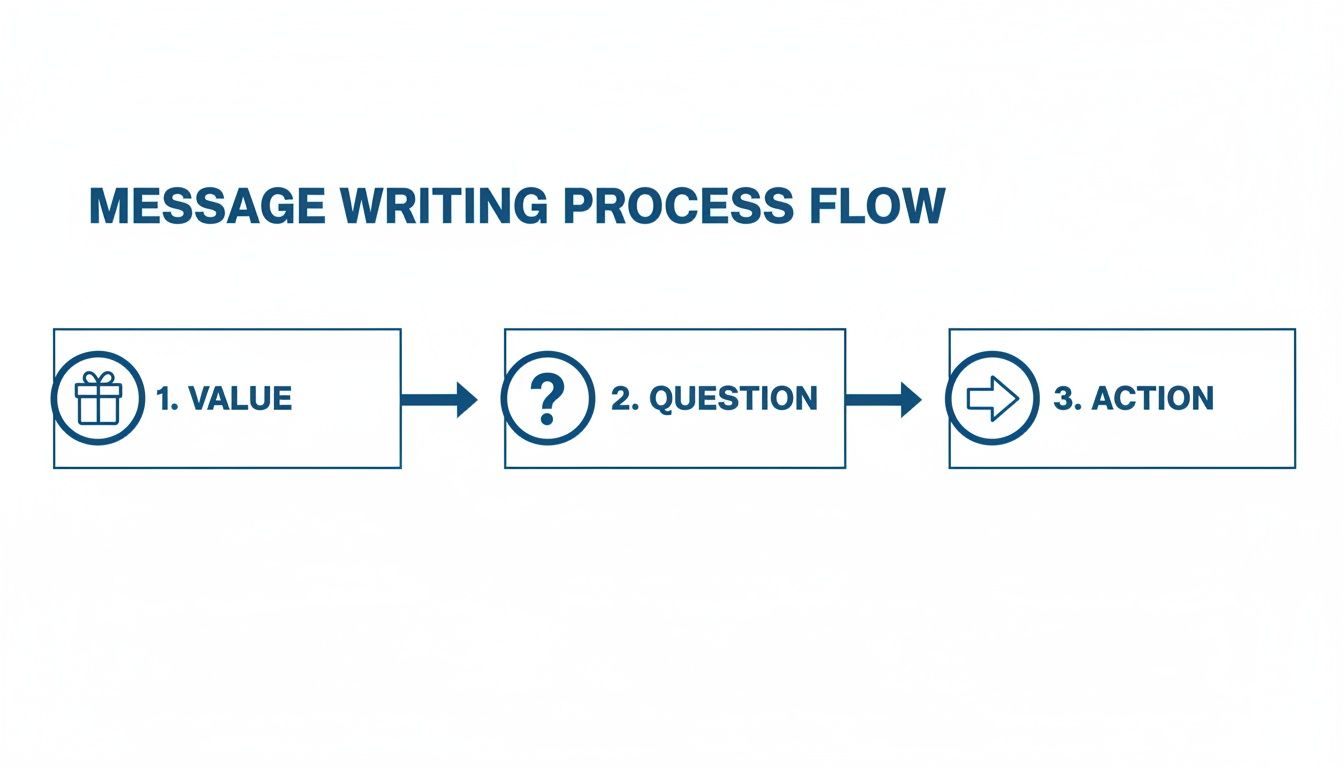
This simple framework keeps the focus entirely on them, which is exactly where it should be. It’s not about you; it's about how you can help them.
Building a Multi-Touch Sequence
A planned-out sequence keeps you from sending random, sporadic messages. And while LinkedIn is an incredible tool, you'll get far better results when you pair it with other channels like email.
We've seen that a coordinated approach using LinkedIn, email, and even the occasional phone call delivers way better results. Seriously. Combined sequences can boost engagement by around 40% and slash cost-per-lead by 31% compared to just sticking to one channel. The sweet spot seems to be 7–10 touches over 2–3 weeks—enough to stay top-of-mind without being a nuisance.
Here’s a simple sequence you can steal and adapt.
A Simple 3-Touch LinkedIn Sequence
- Day 1 (Initial Message): This is your personalized, value-packed message you send right after they accept your connection request.
- Day 4 (Follow-Up 1): Time to share something useful. For instance: "Hi [Name], I saw this report on [Industry Trend] and thought of our chat. The part on page 5 about [Specific Topic] seemed right up your alley."
- Day 8 (Follow-Up 2): Now, ask a smart, open-ended question. Something like: "Hi [Name], hope your week is going well. Was just curious—how is your team thinking about [Challenge] these days? No need for a long reply, just genuinely interested in your take."
This approach respects their time while keeping the conversation alive. And if you want to see how this works for email, we’ve got some great examples of sales follow-up emails you can use for inspiration.
When you consistently follow up with value, you stop being a salesperson and start becoming a trusted resource. That's how you win.
The Unspoken Rules of LinkedIn Messaging
Look, knowing how to send a message on LinkedIn is just the first step. If you want to get real results and build a solid reputation, you have to play by the rules—both the ones LinkedIn tells you about and the ones they don't.
Think of it this way: LinkedIn isn't the wild west. There are guardrails in place to stop the platform from turning into a spam-fest. If you ignore them, you'll get your account restricted, and your outreach efforts will be dead in the water before you even start.
The Official Rules of Engagement
LinkedIn has some hard limits, especially for free accounts. They’re not trying to be difficult; they’re trying to force you to focus on quality over quantity.
- Weekly Connection Limits: LinkedIn doesn't advertise a specific number, but the general consensus is you're capped at around 100-200 connection requests a week. If you consistently push past that, expect to see warning signs and, eventually, a restricted account. It forces you to be pickier.
- InMail Credits: If you’ve invested in a Premium account like Sales Navigator, you get a monthly allowance of InMail credits (anywhere from 5 to 150). These are pure gold. They let you message people you aren't connected with, so don't waste them. Spend them on high-value prospects you’ve actually researched.
These aren't just annoying obstacles. They're a filter designed to weed out the "spray and pray" crowd.
The Unwritten Etiquette That Really Matters
Beyond the official limits, there’s a code of conduct. Breaking these rules won't get your account suspended, but it’s a one-way ticket to being ignored, blocked, or worse—damaging your professional reputation.
This is where the real pros separate themselves from the spammers.
The most successful people on LinkedIn aren't sending mass messages. They are creating original content and doing it consistently. Your goal is to get people to connect with you because they see value in what you’re saying.
Here are the principles I live by:
- Respect their inbox. Keep your messages short and sharp. Nobody has time for a novel. A few well-written sentences will always beat a wall of text.
- Ditch the immediate sales pitch. Seriously, don't do it. Your only goal in that first message is to start a conversation. Build some rapport, offer something valuable, or ask a smart question.
- Know when to walk away. If you've sent two or three polite, non-pushy follow-ups and still hear crickets, it’s time to move on. Constantly poking a cold prospect just makes you look desperate and unprofessional.
It all boils down to empathy. Before hitting 'send', just ask yourself one simple question: "Would I actually be happy to get this message?" If the answer is no, it's time to go back to the drawing board.
Got Questions? Here Are a Few Quick Answers.
Even the sharpest LinkedIn strategy runs into snags. You’ll inevitably have questions about the little details—the mechanics, the etiquette, the "unwritten rules." This is your rapid-fire guide for those moments.
Getting these details right matters. Knowing the character limits or why you're getting ghosted can be the difference between a pipeline full of meetings and a whole lot of frustration.
Can I Send a Message on LinkedIn Without Connecting?
Yes, but it's not the default. The main way to message someone you're not connected to is with InMail, which is part of any LinkedIn Premium subscription. You get a set number of InMail credits each month to reach out directly to people outside your network.
Pro tip: Some people have an "Open Profile," which lets anyone on LinkedIn send them a free message. Always check their profile page for this option before you burn a valuable InMail credit.
There's also a great little workaround: joining the same LinkedIn Groups. If you're in a group with someone, you can often message them directly from the member list. For most people on a free plan, though, a personalized connection request is still the best first move.
What Is the Character Limit for a LinkedIn Message?
The limits are all over the place, and knowing them is key to not getting cut off mid-sentence.
- Connection Request Note: You've got a tiny 300 characters. This isn't for a sales pitch; it's for a quick, compelling hello.
- InMail Message: Much more breathing room here. You get 200 characters for the subject and a hefty 1,900 characters for the body.
- Direct Message: Once you're connected, the gloves are off. The character limit is massive, so you have plenty of space for real conversations.
How Do I Know If Someone Read My LinkedIn Message?
LinkedIn has "read receipts" for this. When someone opens your message, you'll see a small version of their profile picture pop up right below it.
But here's the catch: it only works if both you and the other person have the feature turned on. If you don't see their picture, it could mean they haven't seen it yet… or one of you has receipts disabled. You can find this toggle in your Settings & Privacy > Data Privacy > Messaging experience.
Why Are My LinkedIn Messages Being Ignored?
If your messages are going into a black hole, it’s almost always for one of a few reasons. The number one offender? Zero personalization. A generic, copy-pasted template screams "I don't care about you" and gets deleted instantly.
Another big one is making it all about you. If your message is just a list of your demands with no obvious value for them, why would they reply? And finally, don't sleep on the follow-up. People are busy. A single, polite nudge a few days later is often all it takes to get a response.
Tired of wondering why your messages are being ignored? Growlancer builds predictable B2B sales pipelines by combining expert strategy, authority-building content, and targeted outreach that gets replies. Stop guessing and start booking meetings. Learn how we can build your revenue engine on LinkedIn.