

When people think of using LinkedIn for business, they usually picture sending connection requests and sales pitches. But that’s putting the cart way before the horse. The real work—the stuff that actually builds a predictable pipeline—starts by turning your profile from a dusty old resume into a client-attraction machine.
Building Your Foundation for LinkedIn Success
Before you even think about outreach, you have to get your own house in order. This isn't just about looking professional; it's about building a strategic asset. We're going to lay the groundwork that turns your profile into a resource that screams "I understand your problem, and I can solve it."
This whole foundation rests on three core pillars: dialing in your profile, knowing your target audience inside and out, and positioning your brand.
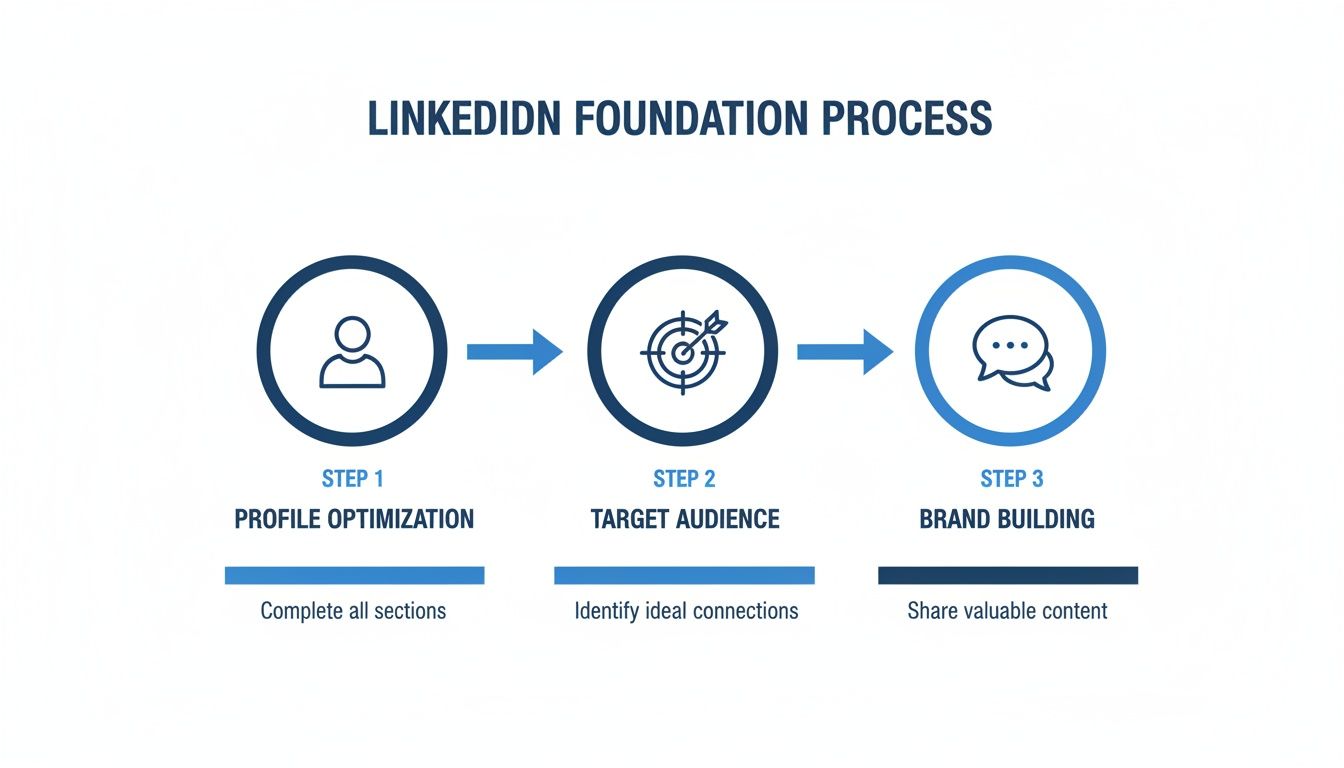
Get these right, and potential clients will land on your page and feel like they've found exactly who they were looking for.
Define Your Ideal Customer Profile
Let's be blunt: if you're trying to talk to everyone, you're talking to no one. The first, most critical step is defining your Ideal Customer Profile (ICP) with obsessive detail. This goes way beyond just job titles and company size.
You need to get inside their heads. What are their biggest headaches? What goals are they trying to hit this quarter? What keeps them up at night? The better you know them, the more your message will connect.
A solid ICP should cover:
- Demographics: The basics—job title, industry, company size, and location.
- Psychographics: What drives them? Think professional goals, hidden frustrations, and career ambitions.
- Pain Points: The specific, nagging problems that your service is built to solve.
- Watering Holes: Where do they hang out online? Which LinkedIn groups are they in? Which influencers do they actually listen to?
Once you have this nailed down, everything else—your content, your outreach, your profile—becomes ten times easier and more effective.
Transform Your Executive Profile
Your personal profile is your digital handshake, and for most prospects, it's the first impression you'll ever make. It needs to position you as an expert and a problem-solver, not just another person looking for a job.
To help you get this right, here’s a quick checklist for both your personal and company profiles. It covers the essential tweaks that make the biggest difference.
Profile Optimization Checklist
| Element | Action Item | Why It Matters |
|---|---|---|
| Profile Photo | Use a high-quality, professional headshot where you look approachable. | Builds instant trust and recognition. People connect with people, not logos. |
| Headline | Change it from "Job Title at Company" to a value proposition, e.g., "Helping SaaS founders scale MRR with predictable outbound systems." | This is your billboard. It tells your ICP exactly what you do for them in the first 3 seconds. |
| Banner Image | Create a custom banner with a clear call-to-action, social proof, or a tagline. | It’s prime real estate to reinforce your value, guide visitors, and stand out from the default blue background. |
| "About" Section | Rewrite it as a client-centric story. Hook them, state their problem, present your solution, and end with a CTA. | This is your sales page. It’s your chance to build a connection and show you understand their world. |
| Experience | Reframe job duties as quantifiable achievements. Use bullet points with metrics (e.g., "Grew pipeline by 250% in 6 months"). | Vague responsibilities are boring. Hard numbers prove your competence and build credibility. |
| Skills & Endorsements | Add at least 5 relevant skills and get endorsements from past clients or colleagues. | LinkedIn’s algorithm uses skills for search. Profiles with 5+ skills get up to 17x more views. |
| Custom URL | Claim your personalized URL (e.g., /in/yourname). | Looks professional, is easy to share, and strengthens your personal brand. |
| Company Page | Ensure your logo, tagline, and "About" section are complete and align with your personal profile's messaging. | Provides social proof and a hub for company-specific content, making your entire operation look more legit. |
Getting these elements dialed in is non-negotiable. It’s the difference between a profile that gets scrolled past and one that starts a conversation.
Let's dig a bit deeper into the most important parts.
Craft a Client-Centric Headline
Your headline is the most valuable real estate on your profile. Stop describing your job title. Instead, describe the result you deliver for your ideal client. Changing "Founder at ABC Solutions" to "Helping B2B SaaS Companies Reduce Churn by 15% with Data-Driven Retention Strategies" isn't just a word change—it's a strategy change.
Write a Compelling Summary
The "About" section is your chance to tell a story, not just list accomplishments. Frame your experience through the lens of your client's world. I like to structure it with a hook, a clear description of the challenges they face, a bridge to my solution, and a direct call-to-action (like booking a call or downloading a resource).
A well-optimized profile isn’t just about looking good; it's a strategic tool. When a prospect lands on your page, they should feel understood and see a clear path to solving their problem.
Showcase Relevant Skills and Experience
Your experience section should be a collection of mini-case studies. Nobody cares about your day-to-day duties. They care about results. So, "Managed a team of 10" becomes "Led a 10-person sales team to achieve 120% of quota for three consecutive quarters." See the difference? One is a task, the other is an achievement.
With over 70% of professional connections now happening on LinkedIn, getting these details right isn't optional. Check out these other powerful LinkedIn statistics to see just how much opportunity is on the table.
Developing Your Authority Content System
Okay, your profile is looking sharp. Now it’s time to add the engine to this whole operation: your content.
This is where most people completely drop the ball. They post when they feel like it, push boring company updates, and then wonder why nothing happens. To make this work, you have to stop thinking in terms of "posts" and start building a repeatable system that establishes you as an authority and turns your profile into a client magnet.
Let's ditch the random acts of content. The whole game is about core content pillars. These are the 2-4 big topics where your expertise smashes right into your ideal client's biggest problems. From now on, everything you publish will connect back to one of these pillars.
This simple shift makes sure you're always on-point, constantly proving you know your stuff, and it kills that "what the heck do I post today?" feeling for good.
Choosing Your Content Formats
Nobody wants to eat the same meal every day. Your content is no different. A healthy mix of formats keeps people interested and lets you deliver value in different ways—whether they're just scrolling, looking to learn something specific, or ready to jump into a conversation.
Here are a few formats that consistently get results. Try to build a rotation of these:
- Text-Only Posts: Absolutely perfect for dropping a strong opinion, asking a sharp question, or telling a quick story. They're dead simple to create and read, which is why they often get a ton of comments and engagement.
- Carousels (PDFs): This is your go-to for teaching something. Use them to walk through a process, visualize data, or break down a complex idea into bite-sized slides. A good carousel screams "expert."
- Image or Video Posts: These formats make you human. Show something behind the scenes, record a quick video tip on your phone, or share a simple graphic. It stops the scroll and makes you memorable.
- Polls: The fastest way to get a conversation started and pull real-time intel straight from your target market. Seriously underrated.
You don't need to be a master of all of them. Just pick a couple that feel natural to you and deliver the goods. If you're stuck, our guide on how to write engaging LinkedIn posts has a bunch more frameworks you can steal.
Establishing a Practical Posting Cadence
I’ll say it loud for the people in the back: consistency beats frequency.
Posting like a maniac for a week and then disappearing for a month is a surefire way to kill your momentum. You need a rhythm you can actually stick with. For most B2B founders and consultants, 3-4 high-value posts per week is the sweet spot.
That's enough to stay on your audience's radar without burning yourself out. Don't forget, LinkedIn is where 97% of B2B marketers are pushing content because it delivers a 58% better ROI. The platform gets nearly 1.8 billion monthly visits, and you want your slice of that attention.
Find a cadence that feels like a habit, not a chore. That’s the only way this works long-term.
Your content system should serve you, not the other way around. The right cadence and formats create a predictable workflow that generates inbound interest without consuming your entire week.
Repurposing Content The Smart Way
Here's the secret weapon for staying consistent without going insane: smart repurposing. One great piece of content can fuel your LinkedIn for an entire week or more.
It’s a simple process:
- The Pillar Asset: Start with one big, valuable piece of content. This could be a webinar you hosted, a podcast you were on, or a deep-dive blog post you wrote.
- Deconstruct for Value: Pull that pillar asset apart. What are the core arguments? The best quotes? The most surprising stats? The key takeaways?
- Create Micro-Content: Each of those little nuggets becomes its own LinkedIn post.
Let's say you did a 30-minute webinar on "Reducing Customer Churn." Here’s how you’d slice it up for the week:
- Monday (Text Post): A provocative take on the #1 mistake companies make with customer retention.
- Wednesday (Carousel): A 5-slide carousel breaking down the "3-Step Framework for Proactive Outreach" you covered in the webinar.
- Friday (Video Clip): A 60-second clip of the most powerful quote or stat from your presentation.
This system squeezes every drop of value from your best ideas and ensures you're always reinforcing your expertise. You’re not just creating more content; you're building a cohesive content ecosystem that positions you as the only person to talk to in your niche.
Mastering Targeted and Personalized Outreach
Alright, you've got your profile looking sharp and your content machine is humming. Now it’s time to switch gears from hoping people find you to proactively building relationships.
This isn't about firing off generic connection requests like a machine gun. It's about mastering targeted outreach that feels human and genuinely valuable from the first click. Forget the spammy stuff that gets you blocked—this is how you start real conversations that turn into real business.
The whole game plan rests on one simple idea: personalization at scale. It means doing a little homework, showing you’re actually interested, and leading with value instead of a sales pitch. It’s the difference between being ignored and getting an enthusiastic, "Yeah, let's connect."

Building Hyper-Specific Lead Lists
Your outreach is only as good as the list you're working from. Sending the perfect message to the wrong person is just a waste of time for both of you. This is where a tool like LinkedIn Sales Navigator becomes your secret weapon, taking you from broad searches to surgical strikes.
Sales Navigator lets you stack filters that go way beyond what the free version offers, so you can build lists of prospects who are a dead-on match for your Ideal Customer Profile (ICP).
Here are a few of my go-to filters for building a killer list:
- "Posted on LinkedIn in past 30 days": This is gold. It instantly weeds out the ghost accounts and shows you who's actually active and likely to see your message.
- "Changed jobs in the past 90 days": New execs are often brought in to shake things up. They have fresh budgets and a mandate for change, making this a massive buying signal.
- Company Headcount Growth: A team that's growing fast is a team with growing pains. They're almost certainly looking for new tools and services to keep up.
- Keywords in Profile: Dig for specific terms in a prospect's bio to find people with the exact experience or interests you're looking for.
Combine a few of these, and you've got a dynamic list of people who aren't just a fit on paper—they're primed and in a position to buy. If you really want to go deep, we've got a full guide on advanced search on LinkedIn that uncovers even more strategies.
Crafting Connection Requests That Actually Get Accepted
Think of your connection request as the first domino. A generic, empty request? Easily ignored. But a thoughtful, personalized one? That opens the door.
The goal here isn't to sell. It's just to get them to click "Accept" so the real conversation can begin. The trick is finding a genuine, non-salesy excuse to connect.
Your connection request note needs to answer one simple question for the person reading it: "Why me, and why now?" A quick, personalized note proves you're not a bot and you've actually looked at their profile.
Here are three dead-simple frameworks that work like a charm:
- The Recent Activity Hook: "Hi [First Name], saw your recent post on [Topic]. Really liked your point about [Specific Insight]. I'm also deep in this space and would love to connect."
- The Shared Connection Hook: "Hi [First Name], noticed we're both connected with [Mutual Connection's Name]. I've been following your work at [Company Name] for a bit and wanted to reach out."
- The Company News Hook: "Hi [First Name], congrats on [Company's Recent Milestone, e.g., funding round, product launch]. Impressive stuff your team is doing. Would be great to connect and follow your journey."
Each one takes about 30 seconds to write but shows you’ve done your homework. This tiny bit of effort can easily push your acceptance rate over 30-40%.
Designing Multi-Touch Follow-Up Sequences
Getting the connection is just step one. The real work—and the real results—happen in the follow-up messages. This is where you build rapport and gently guide the conversation towards a business need without being pushy.
And please, no "just checking in" messages. Every single touchpoint should offer a new piece of value.
A Simple, Proven Follow-Up Sequence
Here’s what a non-aggressive, value-first sequence can look like after they hit "Accept":
| Touchpoint | Timing | Message Focus | Example Snippet |
|---|---|---|---|
| Message 1 | 24 Hours After Connecting | Thank You & Value Offer | "Thanks for connecting, [First Name]. I've been following [Their Company]'s work in [Their Industry] and thought you might find this case study on [Relevant Topic] interesting." |
| Message 2 | 3-4 Days Later | Engage with Their Content | "Just saw your latest post about [Topic]. Great point! It reminded me of a similar challenge we helped a client solve, resulting in a 25% increase in [Metric]." |
| Message 3 | 5-7 Days Later | Gentle Pivot to a Question | "Curious, how is your team at [Company Name] currently approaching [Challenge Related to Your Service]? It's a common hurdle for many in your space." |
| Message 4 | 7+ Days Later | The Soft Ask | "If you're open to it, I'd be happy to share a few ideas on how you might tackle [Challenge] in a brief 15-minute chat. No pressure at all if the timing isn't right." |
This patient approach respects their time and their inbox. You come across as a helpful expert, not just another salesperson. When they are ready to talk, you'll be the first person they think of. This is how you stop just networking and start building a predictable pipeline.
Creating a Sustainable Engagement Workflow
Let's be honest. A killer profile and some slick content are great, but they won't build a pipeline by themselves. The real difference between LinkedIn amateurs and the pros who get predictable results comes down to one thing: consistent engagement.
This isn't about being glued to your phone for hours. It’s about building a smart, repeatable workflow that keeps you visible and effective without completely derailing your day. Sporadic effort gets you sporadic results. A real system, on the other hand, turns your LinkedIn activity into a reliable growth engine.
The goal here is simple: focus on the high-leverage interactions that build actual relationships and cut out the mindless scrolling.
The Power of Time-Blocked Engagement
The single biggest mistake I see people make is treating LinkedIn like an endless, chaotic to-do list. Don't do that. Instead, block out a specific, non-negotiable chunk of time every single day for strategic engagement. For most executives, 15-20 minutes is all it takes to make a real impact.
This isn't time for creating content or just browsing the feed. This focused block has two very specific jobs:
- Nurture Your Network: Spend the first half of your time dropping thoughtful comments on posts from your ideal prospects, top clients, and industry players. One meaningful comment that adds to the conversation is worth a hundred generic "great post!" replies.
- Respond to Your Audience: Use the other half to reply to every single comment on your own posts. This does two things: it shows people you're actually listening, and it builds a community around your expertise, which encourages even more engagement down the line.
This simple, disciplined routine makes sure you’re hitting the most critical, relationship-building tasks every single day. No exceptions.
Taming the LinkedIn Inbox
Your LinkedIn inbox can go from zero to a hundred real quick. One minute it's empty, the next it's a messy pile of spam, connection requests, and—if you’re lucky—a few genuine opportunities. Without a system, warm leads will fall through the cracks. It's inevitable.
The trick is to manage your inbox proactively, not reactively.
Start by creating a simple tagging system to categorize your conversations. You don't need anything complicated. A few labels like "Hot Lead," "Nurture," "Follow-Up," and "Not a Fit" will do the job. This lets you immediately see what needs your attention and where to focus your energy.
Your inbox is the command center for your entire LinkedIn pipeline. It's where connections turn into conversations, and conversations turn into clients. Don't let it become a digital junk drawer.
For example, when a prospect you've been targeting replies to a message, immediately tag them as a "Hot Lead" and set a reminder. This simple action prevents a promising conversation from getting buried under the next wave of notifications.
Balancing Automation with Authenticity
Look, real-time engagement is where trust is built, but that doesn't mean every single task has to be done by hand. Smartly using scheduling tools for some of your content is a complete game-changer for staying consistent.
Platforms like Buffer or Hootsuite are perfect for scheduling your pre-planned content pillars, like those big carousels or framework posts you’ve already created. Doing this frees up your mental bandwidth and your daily time blocks for the stuff that absolutely requires a human touch:
- Replying to DMs from qualified prospects.
- Jumping into timely industry discussions.
- Sending truly personalized outreach to new connections.
Think of it like this: automate the distribution, but personalize the interaction. Scheduling your cornerstone content guarantees you have a steady presence, while your daily engagement workflow is where you show up to build authentic, real-time relationships. This balanced approach is what turns LinkedIn from a daily time sink into a predictable engine for your business.
Measuring Your LinkedIn B2B Pipeline
Posting content and sending messages without tracking the results is just a hobby. You can have the slickest profile and the most clever content on the planet, but if you can't connect your LinkedIn efforts to actual business outcomes, you're flying blind.
This is the part where we close the loop. It’s where we turn all that activity into a predictable, measurable pipeline.
I’m not talking about chasing vanity metrics like views or follower counts. Those are nice for the ego, but they don't keep the lights on. We're zeroing in on the numbers that directly translate to revenue and prove your time on LinkedIn is money well spent.
This is what elevates LinkedIn from "just another social platform" into a core part of your revenue engine.
Getting Leads Out of LinkedIn and Into Your CRM
First things first: your LinkedIn inbox cannot be a graveyard for good conversations. Every single promising lead needs to be moved into your CRM. That’s your single source of truth.
Manually copying and pasting contact info is a recipe for disaster—it's slow, tedious, and things get missed. While LinkedIn doesn't play nice with every CRM out of the box, you can use tools like Zapier to build simple automations.
For example, you could create a "zap" that automatically creates a new contact or deal in your CRM the moment you tag a conversation in a LinkedIn helper tool.
The goal is simple: get qualified leads out of LinkedIn and into your sales process as seamlessly as possible. This makes proper follow-up a guarantee and gives you a clear line of sight from that first connection to a closed deal.
This structure is crucial. For a deeper look at the mechanics, our guide on how to build a sales pipeline breaks down exactly how to set this up.
The Metrics That Actually Move the Needle
To figure out what’s working, you need to track a handful of key metrics. These numbers tell the real story, from your first message to the final invoice.
Here’s what you should be looking at every single week:
- Connection Request Acceptance Rate: This tells you if your targeting and initial message are effective. If you’re below 20%, something's wrong. You're either talking to the wrong people or your note is falling flat. Aim for 30% or higher.
- Reply Rate to Follow-Ups: Once they connect, how many people actually respond to your messages? This is a huge indicator of whether your value proposition resonates. A high reply rate is a leading sign of meetings to come.
- Qualified Meetings Booked: This is where the rubber meets the road. How many conversations are turning into actual sales calls with people who fit your ICP? This is your most important top-of-funnel metric, bar none.
- Pipeline Value Generated: What’s the total potential dollar value of all the opportunities you’ve created from LinkedIn this month? This connects your daily grind directly to potential revenue.
- Revenue Closed from LinkedIn: The ultimate scorecard. How much cash in the bank can you trace directly back to a LinkedIn lead?
It's no accident that 80% of B2B leads from social media come from LinkedIn. The platform’s effectiveness is a staggering 277% higher than Facebook for a reason.
Your 30-Minute Performance Check-In
Data is useless if you don't act on it. Block out 30 minutes every week or two to review these numbers. This simple habit helps you spot what’s working, what's broken, and where to focus your energy next.
Your metrics tell a story. A high acceptance rate but a low reply rate means your intro is great, but your follow-up is weak. Good conversations but no meetings? Your "ask" might be unclear or timed poorly.
During this review, ask yourself a few tough questions:
- Which outreach templates are getting the best acceptance rates? Let's double down on those.
- What kind of post drove the most inbound messages that led to a meeting? Let's make more content like that.
- Is our reply rate dipping? Maybe it’s time to A/B test a new offer in our sequence.
This constant loop—measure, analyze, optimize—is how you turn random wins into a system. It takes the emotion and guesswork out of the equation, letting you systematically improve your results and confidently scale what works.
To give you a clear snapshot, here’s a quick breakdown of the key metrics we track for our clients to measure the health of their LinkedIn pipeline.
Key LinkedIn Metrics To Track
| Metric | What It Measures | Target Benchmark |
|---|---|---|
| Connection Acceptance Rate | The effectiveness of your targeting and initial outreach message. | > 30% |
| Reply Rate | How many new connections engage with your follow-up messages. | > 20% |
| Meetings Booked | The number of qualified sales calls scheduled from conversations. | Varies by industry |
| Pipeline Value | The total potential deal value of all opportunities generated. | Growing month-over-month |
| Cost Per Meeting | The total cost (time + tools) divided by the number of meetings booked. | Decreasing over time |
| Revenue Attributed | The amount of closed-won revenue sourced from LinkedIn. | The ultimate ROI metric |
Keeping a close eye on these numbers is non-negotiable. They provide the clarity you need to know if your strategy is actually working or if you’re just spinning your wheels.
Common Questions About Using LinkedIn for Business
Even with a perfect playbook, some questions always come up when you start getting serious about using LinkedIn to find clients. The platform has its quirks, and it's easy to get stuck.
Let's clear the air on a few of the most common hurdles I see people run into.
One of the biggest ones is always about time. How much do you really have to put in to see this work? The good news is, it's not about being glued to your screen all day. It's about small, focused bursts of the right activity.
A solid, sustainable workflow is about 20-30 minutes a day. That's it. But this isn't mindless scrolling. It's a dedicated block for commenting on your ideal prospects' posts, engaging with people who comment on your content, and clearing your inbox. Doing this consistently is way more powerful than spending three hours on a random Tuesday and then disappearing for a week.
Is a Paid LinkedIn Plan Necessary?
Next up: do you absolutely need to shell out for a paid plan like Sales Navigator?
When you're just starting out, the free version of LinkedIn is all you need. You can get your profile dialed in, start posting good content, and make your first connections without paying a cent. Get the foundation right first.
But once you’re ready to get proactive with outreach, a paid plan becomes non-negotiable. Sales Navigator unlocks advanced search filters that are critical for building super-targeted lead lists.
The ability to zero in on people who are active on the platform, who recently changed jobs, or whose companies are hitting specific growth milestones is a total game-changer. It turns outreach from a guessing game into a precise, data-backed process.
Think of it like this: free LinkedIn is for building your brand. Sales Navigator is for building your pipeline. Master the free side first, and when your content machine is humming, invest in the paid tools to really scale up your lead gen.
How Quickly Can You Expect to See Results?
And finally, the million-dollar question: how long until you actually see results, like booked meetings and new revenue? While every business is unique, a well-run system can get you traction a lot faster than you’d think.
If you’re consistent, it’s completely realistic to start seeing your first qualified meetings land on the calendar within 14-21 days.
This early momentum comes from getting all the pieces working together:
- A sharp profile instantly makes you look like a credible expert.
- Targeted outreach gets you in front of the right people with the right message.
- Consistent content builds your authority and starts pulling in opportunities over time.
The secret is treating LinkedIn like a complete system, not a checklist of random tasks. When your profile, content, and outreach are all in sync, you create a predictable engine for B2B growth. Those initial wins give you the confidence to keep going, and the results just compound from there as your network and authority grow.
At Growlancer, we don’t just teach this stuff—we build and manage these predictable B2B sales pipelines for our clients, mixing expert strategy with hands-on execution. If you're ready to turn your leadership team's LinkedIn profiles into a revenue machine, see what our done-for-you services can do for you.